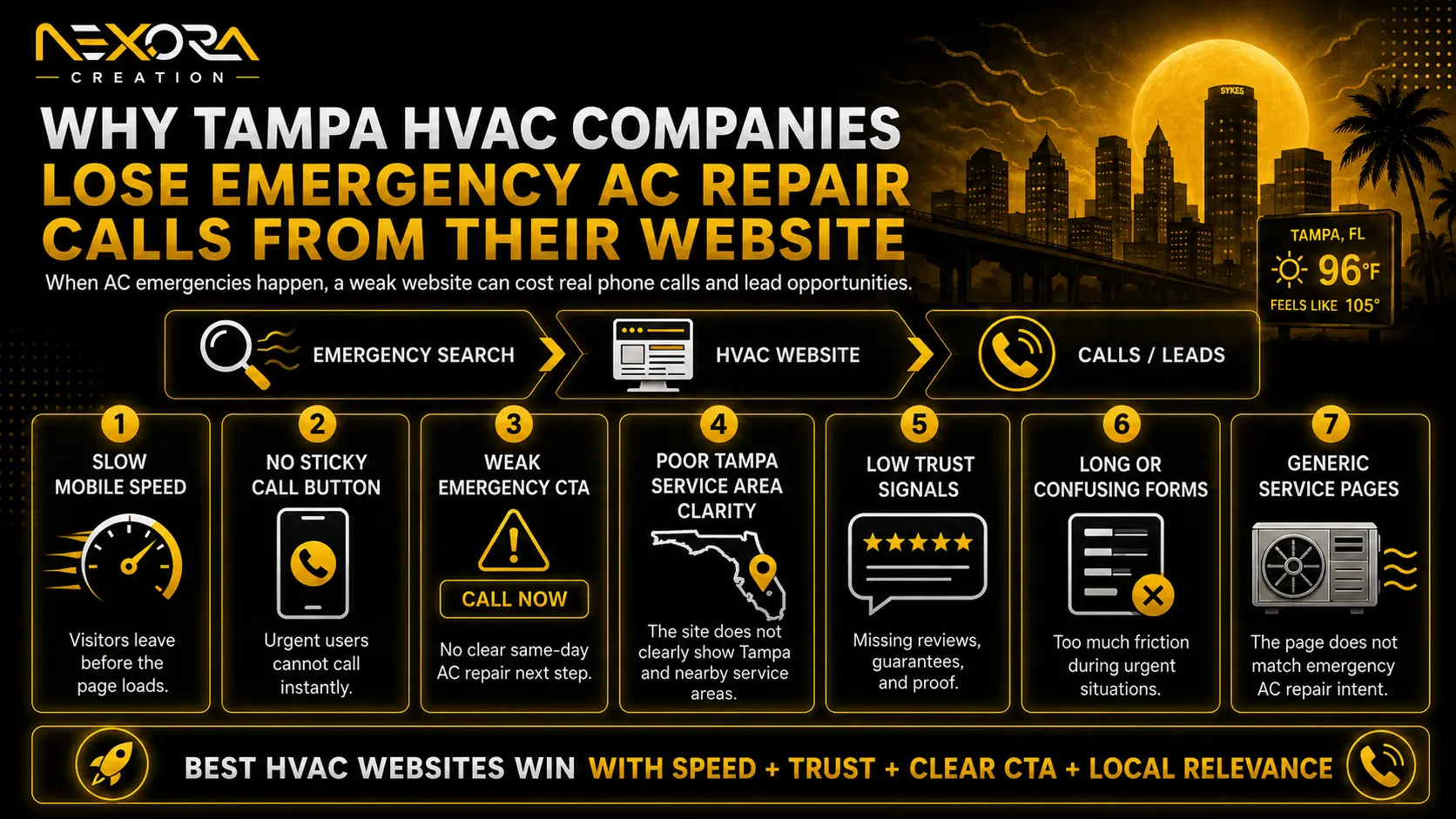
When an air conditioner stops cooling during a hot day, the homeowner searching for help is not browsing casually.
They are usually trying to answer three immediate questions:
- Can this HVAC company help with my problem?
- Can I speak to someone now?
- Can I trust this company enough to call?
If an HVAC website cannot answer those questions quickly, the visitor may return to Google and contact another company.
In my experience reviewing service-business websites, emergency HVAC calls are rarely lost because of one isolated website issue. A hidden phone number may be part of the problem, but the full journey is usually more complicated.
The visitor may land on the wrong page. The headline may not confirm emergency service. The website may load slowly on mobile. Reviews may appear too late. The company may receive the call but fail to answer or recover it.
That is why I evaluate emergency-call performance as a connected system rather than a collection of unrelated website features.
I use a four-stage framework:
- Search-to-page match: Did the visitor reach the right page?
- Decision clarity: Can they confirm the service, availability and credibility?
- Call accessibility: Can they start a call without unnecessary effort?
- Call handling: Is the call tracked, answered and connected to a real outcome?
This guide explains how HVAC companies can identify where emergency AC repair calls are being lost and what they should fix first.
Why Emergency HVAC Visitors Behave Differently
Not every HVAC visitor has the same intent.
Someone researching a maintenance plan, replacement system or indoor air quality service may be willing to read several pages, compare options and request information later.
An emergency AC repair visitor behaves differently.
They may be dealing with:
- An AC system that will not turn on
- Warm air coming from the vents
- Weak airflow
- A thermostat that is not responding
- Water leaking around the unit
- Frozen coils
- Unusual noises
- A burning smell
- Repeated short cycling
- A home becoming uncomfortable quickly
They are usually looking for action rather than education alone.
Their search may include phrases such as:
- Emergency AC repair
- 24-hour AC repair
- Same-day AC repair
- AC not cooling
- HVAC repair near me
- Urgent air-conditioning repair
A visitor with this level of intent does not want to investigate whether the company handles urgent work. The page should confirm that clearly.
This does not mean the page should use exaggerated urgency or make promises the company cannot fulfil. It means the page should provide accurate information quickly.
If after-hours service is available, say so.
If the company offers same-day appointments rather than true 24-hour service, explain that distinction.
If service availability depends on technician capacity, do not present guaranteed response times that the team cannot consistently deliver.
Clear information builds more trust than vague emergency claims.
The Four Places HVAC Websites Lose Emergency Calls
When I audit an emergency HVAC journey, I do not begin by counting the number of buttons on the page.
I test the full path a mobile visitor would follow:
- What did they search?
- Which page did they reach?
- What do they see first?
- Can they confirm the company handles the issue?
- Can they find credible proof?
- Can they start a call easily?
- What happens when the call is not answered?
- Can the business connect that call to a booked job?
This usually reveals one or more failures across four stages.
Stage 1: The Visitor Reaches the Wrong Page
The first problem often happens before the visitor has a chance to evaluate the company.
The searcher reaches a page that is too broad for their need.
Sending emergency traffic to a generic homepage
Many HVAC companies send organic or paid emergency traffic to the homepage.
A homepage may discuss:
- AC installation
- Heating
- Maintenance plans
- Indoor air quality
- Commercial HVAC
- Financing
- Company history
- Promotions
All of that information may be relevant to the business, but it can dilute the emergency-repair journey.
A visitor searching for urgent repair should not have to inspect a long list of services to confirm that the company can help.
A focused emergency AC repair page can provide a clearer path.
The page should immediately explain:
- The emergency or urgent repair service
- The symptoms the company handles
- The area served
- Current availability or response expectations
- How to call or request service
- What happens after contact
emergency AC repair landing page
Weak search-to-page relevance
A page does not need to repeat an exact keyword in every section, but its purpose should be unmistakable.
Consider this journey:
Search: Emergency AC repair Tampa
Page headline: Complete Heating and Cooling Solutions
CTA: Learn More
The page may be broadly relevant to HVAC, but it does not immediately confirm emergency AC repair.
A clearer journey would be:
Search: Emergency AC repair Tampa
Page headline: Emergency AC Repair in Tampa
CTA: Call for Emergency AC Service
The second version reduces uncertainty.
For paid search, this alignment is especially important. Google Ads evaluates factors including the usefulness and relevance of the advertisement and landing page, the expectations created by the advertisement, and ease of navigation. Google also identifies landing-page experience as one of the components used in Quality Score diagnostics.
The practical lesson is simple:
Do not treat the advertisement, keyword and landing page as separate assets.
They should continue one clear promise.
Using one page for several different intentions
I often see HVAC pages trying to target several intents at once:
- Emergency repair
- Routine repair
- New system installation
- Maintenance
- Financing
- Commercial service
That can create a page that mentions everything but prioritizes nothing.
A visitor searching for urgent repair needs a different decision path from someone researching a replacement system.
Where the intent, offer and next action are materially different, separate service pages are usually clearer.
Stage 2: The Visitor Cannot Decide Quickly
Reaching the correct page is not enough.
The visitor must be able to confirm service, availability and credibility without searching through the website.
Confirm the Service Above the Fold
The first visible section should help an emergency visitor understand:
- What service is available
- Who it is for
- Where it is available
- How to contact the company
- What response they can reasonably expect
A generic headline such as:
Quality HVAC Services You Can Trust
does not clearly answer the visitor’s urgent question.
A more useful headline may be:
Emergency AC Repair for Tampa Homeowners
Or, when the company cannot honestly promise 24-hour service:
AC Not Cooling? Request the Next Available Repair Appointment
The second example may sound less dramatic, but it is more transparent if that reflects the actual service model.
A strong hero section could include:
Headline:
Emergency AC Repair in Tampa
Supporting text:
AC not cooling, leaking or refusing to start? Call to check current technician availability in Tampa and nearby service areas.
Primary CTA:
Call for Emergency AC Repair
Supporting proof:
Licensed and insured • Local reviews • Clear service-area information
The exact wording should reflect the company’s real availability, qualifications and service boundaries.
Explain Which AC Problems You Handle
Emergency visitors may not know the technical name of the problem.
They may only know that:
- The system is running but the home is still warm
- The thermostat is blank
- The outdoor unit is making a loud noise
- Water is collecting near the indoor unit
- The breaker keeps tripping
- Airflow has suddenly become weak
A useful emergency page should explain the symptoms that may justify calling.
For example:
Call for urgent AC repair when your system stops cooling, will not turn on, leaks water, produces a burning smell, repeatedly trips the breaker or begins making unusual mechanical noises.
Avoid presenting every issue as a dangerous emergency.
Some symptoms may require urgent professional attention, while others may be suitable for a scheduled repair. The page should help the homeowner make an informed next step without offering unsafe diagnostic instructions.
The purpose of this section is not to turn the visitor into a technician.
It is to help them confirm that the company handles the problem.
Make Service Areas Clear
A homeowner should not have to open the footer, contact page and Google Business Profile to determine whether the company serves their location.
The page should clearly explain the real service area.
For example:
We provide AC repair across Tampa and selected nearby communities. Call to confirm availability for your ZIP code.
Only include locations the company genuinely serves.
Adding a long list of city names does not automatically improve local rankings. Google explains that local results are mainly influenced by relevance, distance and prominence. A website can strengthen relevance and business information, but it cannot remove the distance between the searcher and the business.
For this reason, I do not recommend creating large numbers of nearly identical city pages with only the location name changed.
A city or service-area page should contain genuine local value, such as:
- The exact service available
- Operational coverage
- Local scheduling information
- Relevant projects or reviews
- Area-specific FAQs
- Clear contact options
AC repair SEO for emergency searches
Build Trust Before Asking for the Call
Emergency intent is strong, but it does not eliminate risk.
A homeowner may still compare several companies before calling.
They may ask:
- Is this a real local business?
- Is it licensed and insured?
- Have other homeowners used it?
- Will someone actually answer?
- Are the reviews recent?
- Will I understand the next step?
- Does the company serve my area?
- Are the emergency claims genuine?
Useful trust signals can include:
- Google review rating
- Recent customer reviews
- Relevant repair testimonials
- Licence and insurance information
- Technician or team photographs
- Service vehicle photographs
- Years of relevant experience
- Clear warranty information
- Financing information where relevant
- Accurate business contact details
- A visible service process
- Real project or repair examples
Trust proof should appear near the decision point.
For example:
- Add a short review beneath the primary call button.
- Display licence information near the service claim.
- Place recent repair testimonials beside the contact section.
- Explain what happens after the customer calls.
- Show the real team rather than relying only on stock images.
I frequently find that HVAC businesses already possess strong proof, but their websites do not use it effectively.
The reviews may exist only on Google.
The project photographs may remain on a technician’s phone.
The warranty information may only be explained during the call.
The team may have years of experience that the website never presents clearly.
Improving trust does not always require creating something new. Sometimes it requires organizing existing proof around the visitor’s decision.
Avoid Unsupported Emergency Claims
Trust can also be lost when the website promises more than the operation can deliver.
Examples include:
- Advertising 24-hour service when calls are not answered overnight
- Promising immediate arrival without technician availability
- Claiming guaranteed repairs without clear conditions
- Showing locations that the company does not serve
- Using review statistics that are no longer accurate
- Displaying licences or certifications without context
The website, advertisements and call-handling process should make consistent promises.
If the page says “Call now for 24-hour emergency service,” but the caller reaches voicemail with no recovery process, the website has created demand the business cannot handle.
That is not only a conversion problem. It is a trust problem.
Stage 3: The Visitor Cannot Start the Call Easily
After deciding that the company may be suitable, the visitor needs an immediate contact path.
This is where many mobile HVAC websites create unnecessary friction.
Make the Phone Number Easy to Find
For an emergency-repair page, the phone number should usually be visible in several useful locations:
- Header
- Hero section
- Sticky mobile bar
- Mid-page CTA
- Contact section
- Final CTA
This does not mean filling every section with oversized buttons.
The goal is to ensure that the caller never has to search for a contact method.
On mobile, the number should be tappable.
The CTA should explain the action:
- Call for Emergency AC Repair
- Check Current Repair Availability
- Speak With the HVAC Team
- Request Urgent AC Service
Avoid vague button labels such as:
- Learn More
- Explore
- Continue
- Click Here
Those labels do not tell an urgent visitor what will happen.
Use a Sticky Mobile Call Button Carefully
A sticky mobile CTA can remain visible as the visitor scrolls.
For emergency HVAC pages, this can reduce the need to return to the top of the page.
The button should be:
- Large enough to tap
- Clearly labelled
- Connected to the correct number
- Visible without covering important content
- Tested across common screen sizes
- Consistent with actual service availability
A sticky CTA can still create problems when it:
- Covers form fields
- Blocks navigation
- overlaps cookie notices
- Uses a number that is not tracked correctly
- remains visible when the business cannot receive calls
- competes with several other floating widgets
I do not recommend adding a sticky call button simply because it is considered a conversion best practice.
I recommend it when testing shows that it makes the real mobile journey easier.
Reduce Competing Actions
Emergency pages often contain too many choices:
- Call now
- Book online
- Start a chat
- Request a quote
- Download a guide
- Join the maintenance plan
- View financing
- Subscribe to email updates
Each action may be useful somewhere on the website, but presenting them with equal importance can slow the emergency visitor.
For urgent repair, the primary action is usually the call.
A secondary form can support people who cannot call immediately.
Other offers should remain visually secondary or appear later in the journey.
A simple hierarchy might be:
Primary: Call for Emergency AC Repair
Secondary: Request a Callback
Supporting: View Service Information
Keep the Emergency Form Short
Some visitors will prefer a form, especially when they are in a noisy environment, cannot speak immediately or want a callback.
The form should ask only for information needed to respond.
Useful fields may include:
- Name
- Phone number
- ZIP code
- AC problem
- Preferred callback time
Email can be optional when phone follow-up is the operational priority.
Avoid requiring a long system history, detailed property information or several dropdown selections before the company has made contact.
After submission, explain:
- Whether the request has been received
- Whether it confirms an appointment
- Who will contact the customer
- The expected response window
- What to do if the situation becomes unsafe
Do not imply that a submitted form guarantees immediate service unless the business process supports that promise.
Improve Mobile Speed Without Reducing the Page to a Score
Emergency HVAC visitors frequently arrive through mobile search.
If the page takes too long to become usable, the visitor may return to the results and call another company.
Common causes of delay include:
- Oversized hero images
- Video backgrounds
- Heavy sliders
- Multiple chat widgets
- Excessive scripts
- Unoptimized fonts
- Bloated themes or page builders
- Too many tracking tools
- Slow hosting
- Third-party review widgets
The emergency page should prioritize the content required to act:
- Headline
- Service confirmation
- Call button
- Phone number
- Trust proof
- Short form
Google recommends good Core Web Vitals as part of a broader page experience, but also states that strong scores alone do not guarantee top rankings.
I treat speed in the same practical way.
A PageSpeed score can identify technical issues, but it does not tell me whether a homeowner can confidently start a call.
I test both:
- Technical performance: How quickly does the page load and respond?
- Task performance: How quickly can a visitor understand the service and contact the company?
HVAC website speed and emergency leads
Remove Mobile Obstacles
A fast page can still lose calls when its interface is difficult to use.
Check for:
- Pop-ups covering the call button
- Cookie notices blocking the sticky CTA
- Tiny tap targets
- Phone numbers placed inside images
- Forms requiring excessive typing
- Menus that are difficult to close
- Text that is too small
- Layout shifts moving the button
- Auto-playing audio
- Chat widgets covering important content
During an audit, I test the page as a real visitor rather than only reviewing it from a desktop.
I try to:
- Confirm emergency service
- Find the service area
- Read a review
- Tap the phone button
- Complete the form
- Close every overlay
- Return to the previous page
If any of those simple actions becomes difficult, the mobile journey needs improvement.
Stage 4: The Business Loses the Call After Intent Exists
A website can perform its role correctly and the business can still lose the opportunity.
The visitor may tap the call button, but:
- No one answers
- The call goes to the wrong department
- The caller waits too long
- Voicemail gives no clear next step
- The missed call is never returned
- The business cannot identify the lead source
- No one records whether the call became a booking
For emergency HVAC services, call handling is part of conversion performance.
Track Calls as Business Outcomes
Basic click tracking can show that someone tapped a phone number.
It does not prove:
- The call connected
- Someone answered
- The caller needed emergency repair
- The lead was qualified
- An appointment was booked
- The job was completed
- Revenue was generated
A useful measurement setup may include:
- Click-to-call events
- Call-source tracking
- Call duration
- Answered versus missed calls
- New caller versus repeat caller
- Qualified emergency calls
- Booked appointments
- Completed jobs
- Revenue where available
This helps distinguish website activity from actual lead performance.
For example:
- Many phone clicks but few connected calls may indicate routing or tracking problems.
- Connected calls with few bookings may indicate qualification, pricing or availability issues.
- Strong bookings from one service page may justify further investment in that page.
- Calls from irrelevant queries may indicate targeting problems.
I prefer to connect website data with the company’s real lead records rather than treating every phone click as a successful conversion.
Create a Missed-Call Recovery Process
Emergency callers often contact more than one HVAC company.
If the first call is missed, the opportunity may disappear quickly.
A recovery process may include:
- Immediate missed-call notification
- A clear voicemail message
- An automatic acknowledgement text
- A callback assignment
- After-hours routing
- Lead-source capture
- Follow-up status
- Escalation when no one responds
Automation can support this process, but automation cannot replace operational responsibility.
Someone still needs to own the lead.
The business should define:
- Who answers during normal hours
- Who handles after-hours enquiries
- What happens when the primary person is unavailable
- How quickly missed calls should be returned
- Which emergencies the company can accept
- How unavailable service is communicated honestly
Keep the Website Promise Consistent With Call Handling
One of the most important checks I perform is comparing the website promise with the real response process.
If the website promises:
Speak with someone now
but every call reaches voicemail, the experience is inconsistent.
If the website says:
Request a callback
and the form clearly explains the expected response time, the promise may be more credible.
The correct CTA is not necessarily the most aggressive one.
It is the one the business can fulfil consistently.
My Four-Stage Emergency Call Audit
When I review an HVAC website for emergency-call performance, I work through the following process.
1. Search-to-page match
I review:
- Search queries
- Paid keywords
- Landing pages
- Advertisement promises
- Page headlines
- Service intent
I want to know whether urgent visitors are reaching a page designed for urgent repair.
2. Above-the-fold confirmation
I check whether the first screen communicates:
- Emergency or urgent repair availability
- Service area
- Main AC problems handled
- Primary phone CTA
- Credible proof
- Realistic response expectations
3. Mobile call accessibility
I test:
- Tap-to-call buttons
- Sticky CTA behaviour
- Loading speed
- Mobile overlays
- Form usability
- Button visibility
- Phone-number accuracy
My practical test is simple:
Can a visitor confirm the service, see credible proof and start a call without searching through the navigation?
4. Call handling and recovery
I verify:
- Whether calls are tracked
- Whether the number routes correctly
- What happens after a missed call
- Whether leads are assigned
- Whether bookings are recorded
- Whether outcomes can be connected to pages and campaigns
This four-stage method prevents me from applying the same recommendation to every HVAC website.
One business may primarily have a landing-page problem.
Another may have a mobile usability issue.
Another may generate plenty of calls but fail to answer them.
Another may answer calls but attract the wrong type of lead.
The correct fix depends on the stage where the journey is breaking.
Emergency HVAC Page Checklist
A focused emergency AC repair page should usually include the following elements.
Clear service headline
The H1 should clearly identify the urgent service and relevant location.
Accurate availability information
Explain whether the company offers 24-hour, after-hours, same-day or next-available service.
Primary click-to-call CTA
The main phone action should be visible immediately and work correctly on mobile.
Common emergency symptoms
Help visitors confirm that the company handles their problem.
Short service explanation
Explain what happens after the homeowner calls.
Local service-area information
State the real areas or ZIP codes served without adding irrelevant city lists.
Reviews and credible proof
Use recent, relevant evidence near the main conversion points.
Licence, insurance and company information
Display only accurate and current credentials.
Short callback form
Offer an alternative path without competing with the primary phone CTA.
Mobile performance
Keep the page responsive, stable and easy to use.
Call and form tracking
Measure meaningful interactions and verify that they reach the business.
Missed-call recovery
Define what happens when the team cannot answer immediately.
conversion-focused website development
Which Issues Should an HVAC Company Fix First?
Do not redesign the whole website based on a generic checklist.
Prioritize according to evidence.
Fix immediately when:
- The phone number is wrong
- Tap-to-call does not work
- The emergency page is broken
- Forms are not delivered
- Calls route incorrectly
- Mobile overlays block the CTA
- The website claims availability the company does not offer
Fix next when:
- Emergency traffic goes to a broad homepage
- The headline does not confirm the service
- Reviews and credentials are difficult to find
- The page loads slowly on mobile
- The service area is unclear
- Call outcomes are not tracked
Test rather than assume when:
- Adding a sticky call bar
- Reducing form fields
- Changing CTA wording
- Removing navigation
- Adding chat
- Creating additional location pages
- Changing the page layout
A technique that improves one HVAC website may not solve another website’s problem.
The data, customer intent and business process should guide the decision.
How Nexora Creation Approaches HVAC Website Conversion
At Nexora Creation, I do not look at an HVAC website only as a design project.
I look at it as a lead journey connecting:
- Search visibility
- Search intent
- Service-page relevance
- Mobile experience
- Trust
- Calls and forms
- Tracking
- Follow-up
- Booked work
My objective is not to add the maximum number of CTAs, keywords or widgets.
It is to identify where a qualified visitor is being lost and remove the specific friction at that stage.
For one website, that may mean creating a dedicated emergency repair page.
For another, it may mean making the phone number visible on mobile.
For another, it may mean improving review placement.
For another, the website may already generate calls, while missed-call handling is the real issue.
That diagnosis should happen before recommending a redesign or increasing advertising spend.
Conclusion
HVAC websites do not lose emergency repair calls for one universal reason.
A call may be lost because the visitor reaches the wrong page, cannot confirm emergency service, does not trust the company, cannot find the phone number or never receives a response after calling.
The strongest emergency-call journey should:
- Match the visitor’s search
- Confirm the service immediately
- Explain real availability
- Show credible proof
- Make the phone action easy on mobile
- Load and function reliably
- Track meaningful call outcomes
- Recover missed opportunities
For emergency HVAC traffic, speed matters—but speed includes more than page loading.
It also means helping the visitor understand, decide and contact the business without unnecessary delay.
Before investing in more SEO or Google Ads, test the full journey from search to answered call.
That is where the real conversion problem usually becomes visible.
Frequently Asked Questions
Why is my HVAC website not generating emergency repair calls?
Your HVAC website may send visitors to a broad page, hide the phone CTA, fail to confirm urgent service, load poorly on mobile, lack trust signals or lose calls after they are placed. Review the full journey rather than assuming the problem is traffic alone.
Should an HVAC company have a separate emergency AC repair page?
A separate page is useful when emergency repair has a distinct search intent, offer and contact path. The page should accurately explain availability, common problems, service areas, trust proof and how to call.
What is the most important CTA for emergency AC repair?
For most emergency AC repair pages, the primary CTA is a clear click-to-call action. A callback form can provide a secondary option for visitors who cannot call immediately.
Should HVAC companies use a sticky mobile call button?
A sticky mobile call button can make calling easier, but it should be tested carefully. It should not cover content, forms, cookie notices or other important controls.
Why should emergency Google Ads traffic not go to a homepage?
A homepage usually covers several services and may not continue the specific emergency promise made in the advertisement. A focused landing page can create stronger keyword, ad and page alignment.
Does website speed affect emergency HVAC leads?
Yes. A slow or unstable page may prevent urgent visitors from reaching the phone CTA. However, speed should be evaluated alongside clarity, trust, mobile usability and call handling.
How should HVAC companies track emergency calls?
Track more than phone-button clicks. Where possible, measure connected calls, answered and missed calls, qualified enquiries, booked appointments and completed jobs.
Can automation recover missed HVAC calls?
Automation can send alerts, acknowledgements and callback tasks, but a person or team must still own the response. The website’s availability promise should match the real call-handling process.