SEO website structure means organizing your pages, URLs, navigation, headings, internal links, and content hierarchy so Google can clearly understand what your website is about and which pages matter most.
A strong website structure helps Google understand:
- What services you offer
- Which pages are most important
- How topics connect
- Which pages support each other
- Which pages should rank for which intent
- Which pages are local, informational, or commercial
- How users should move through the website
- Which pages can generate leads
A weak structure creates confusion.
Google may struggle to understand your main services, crawl important pages less often, choose the wrong page to rank, or treat similar pages as duplicates.
Users may also struggle to find the right service, contact form, pricing information, location page, or next step.
As an SEO expert and website developer, I always look at website structure before writing more content. If the structure is weak, publishing more blogs can create more confusion instead of more rankings.
At Nexora Creation, I treat website structure as both an SEO system and a lead-generation system. The goal is not only to help Google crawl pages. The goal is to help users find the right page, trust the business, and take action.
In this guide, I will explain how to build an SEO website structure that Google can understand and users can easily navigate.
What is SEO website structure?
SEO website structure is the way your website pages are organized and connected.
It includes:
- Main navigation
- Service pages
- Blog categories
- URL structure
- Internal links
- Footer links
- Breadcrumbs
- Page hierarchy
- Heading structure
- Sitemaps
- Topic clusters
- Location pages
- Contact paths
- CTA placement
A strong structure tells Google:
“This is the homepage.”
“These are the main services.”
“These blogs support these services.”
“These location pages target these areas.”
“These pages are important.”
“These pages are related.”
“This page should rank for this type of search intent.”
For example, a digital agency website may have this structure:
- Homepage
- Services
- Website Development
- SEO Services
- CRM Automation
- AI Voice Agents and Chatbots
- UI/UX Design
- Blog
- SEO
- Website Design
- Google Ads
- CRM
- AI Automation
- Contact
This structure is simple.
It helps users and Google understand the website faster.
Why does website structure matter for SEO?
Website structure matters because Google needs to crawl, understand, and connect pages before ranking them.
A strong structure improves:
- Crawlability
- Indexing
- Internal link flow
- Topical authority
- Service-page relevance
- User experience
- Conversion paths
- Local SEO
- AI search understanding
- Content discovery
- Ranking consistency
A poor structure can create:
- Orphan pages
- Duplicate intent
- Keyword cannibalization
- Weak service pages
- Confusing navigation
- Poor internal links
- Thin category pages
- Broken user journeys
- Indexing issues
- Low lead conversion
A website can have great content and still struggle if Google cannot understand how pages connect.
SEO is not only about keywords.
It is also about architecture.
How does Google understand website pages?
Google understands pages by crawling links, reading content, analyzing structure, processing URLs, identifying headings, checking internal links, and evaluating how pages relate to each other.
Google looks at signals like:
- Page title
- URL
- H1 heading
- H2 and H3 headings
- Main content
- Internal links
- Anchor text
- Navigation
- Breadcrumbs
- Schema markup
- Canonical tags
- Sitemap
- Images and alt text
- Page speed
- Mobile usability
- External links
- User intent match
If these signals are consistent, Google can understand the page more easily.
For example, a page with this structure sends clear signals:
- URL:
/services/search-engine-optimization/ - Title: SEO Services for Small Businesses
- H1: SEO Services That Turn Search Traffic Into Leads
- Internal links from SEO blogs
- CTA to schedule SEO consultation
- FAQs about SEO
- Supporting content about technical SEO, local SEO, and content strategy
That page is easy to understand.
A confusing page would have:
- Generic URL
- Generic title
- Multiple unrelated services
- Weak H1
- No internal links
- No clear CTA
- No topic focus
Google and users both need clarity.
What does a good SEO website structure look like?
A good SEO website structure is simple, logical, and easy to navigate.
It usually follows this pattern:
- Homepage
- Main service pages
- Supporting service subpages
- Blog or resource hub
- Topic clusters
- Location pages, if needed
- Case studies or portfolio
- About page
- Contact page
For a service business, a strong structure may look like this:
- Homepage
- Services
- Website Development
- SEO Services
- CRM Automation
- AI Voice Agents and Chatbots
- UI/UX Design
- Industries
- HVAC
- Roofing
- Pool Service
- Contractors
- Clinics
- Local Businesses
- Blog
- SEO
- Website Design
- Landing Pages
- CRM
- AI Automation
- Local SEO
- Contact
This helps users find what they need quickly.
It also helps Google understand your topical focus.
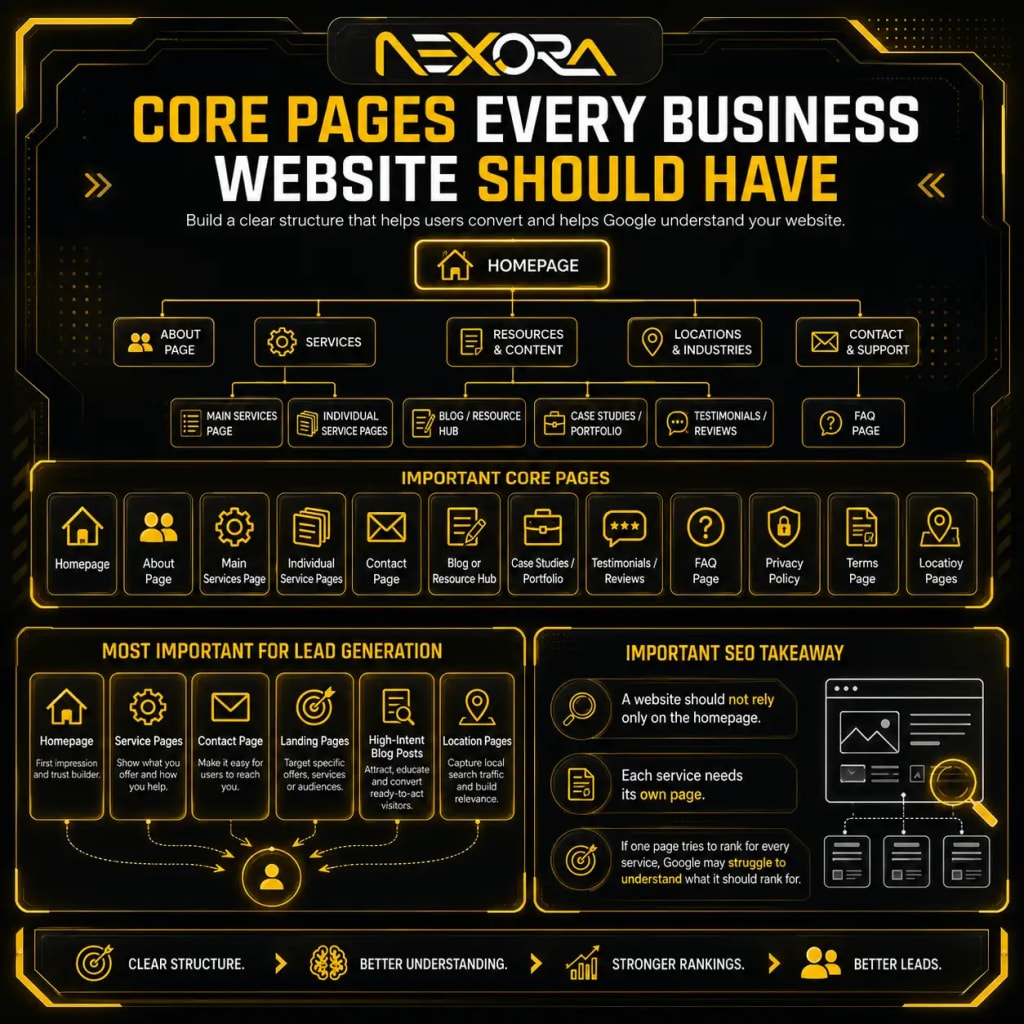
What pages should every business website have?
Every business website should have a clear set of core pages.
Important pages include:
- Homepage
- About page
- Main services page
- Individual service pages
- Contact page
- Blog or resource hub
- Case studies or portfolio
- Testimonials or reviews
- FAQ page, if useful
- Privacy policy
- Terms page, if needed
- Location pages, if local
- Industry pages, if niche-focused
For lead generation, the most important pages are usually:
- Homepage
- Service pages
- Contact page
- Landing pages
- High-intent blog posts
- Location pages
A website should not rely only on the homepage.
Each service needs its own page.
If one page tries to rank for every service, Google may struggle to understand what the page should rank for.
Why should each service have its own page?
Each service should have its own page because every service has different search intent, keywords, FAQs, benefits, examples, and conversion paths.
For example, Website Development and SEO Services are related, but they are not the same intent.
A user searching for “website development services” may want:
- Website design
- WordPress development
- Mobile-friendly layout
- Page speed
- Custom website
- Conversion-focused design
- Contact forms
- Booking flow
A user searching for “SEO services” may want:
- Keyword research
- Technical SEO
- Content strategy
- Local SEO
- Google Search Console analysis
- Ranking recovery
- Internal links
- SEO reporting
If both services are only on one page, the content becomes broad and weak.
A dedicated service page can include:
- Clear headline
- Service-specific problem
- Benefits
- Process
- Deliverables
- FAQs
- Trust proof
- CTA
- Internal links
- Related blogs
This gives Google and users a clearer page.
How should you structure service pages for SEO?
A strong SEO service page should answer the user’s main questions and guide them toward action.
Use this structure:
- Hero section
- Clear H1
- Short value proposition
- Primary CTA
- Problem section
- Service explanation
- Benefits
- Process
- Deliverables
- Proof or portfolio
- FAQs
- Related internal links
- Final CTA
A service page should answer:
- What service do you provide?
- Who is it for?
- What problem does it solve?
- What is included?
- How does your process work?
- Why should users trust you?
- What should they do next?
For example, an SEO Services page should include:
- Technical SEO
- On-page SEO
- Content strategy
- Local SEO
- Google Search Console analysis
- Internal linking
- Ranking recovery
- Reporting
- Lead-focused SEO strategy
If your service pages are thin, generic, or unclear, Google may not understand them well.
Users may also leave without contacting you.
How should you structure blog content around service pages?
Blog content should support service pages.
A blog should not exist alone.
Each blog should connect to a service, topic cluster, or lead path.
For example:
SEO Services can be supported by blogs like:
- Lost Keywords in Google Search Console
- Content Decay SEO
- Technical SEO Issues That Cause Ranking Loss
- SEO Recovery Checklist
- How to Compare GSC Data During an SEO Drop
- Why Your Website Is Not Ranking on Google
- Local SEO for Small Businesses
Website Development can be supported by blogs like:
- Why Your Website Is Not Generating Leads
- Landing Page vs Website for Google Ads
- Website Structure for SEO
- Google Ads Landing Page Experience
- Website Design for Local Service Businesses
CRM Automation can be supported by blogs like:
- How CRM Automation Prevents Lost Leads
- Why Leads Get Lost After Form Submission
- How to Track Website Leads in CRM
- Online Booking for Service Businesses
AI Chatbot Services can be supported by blogs like:
- Can AI Chatbots Generate Leads?
- AI Receptionist for Local Businesses
- How AI Voice Agents Reduce Missed Calls
This creates topical authority.
It also creates natural internal links.
What is a topic cluster in SEO website structure?
A topic cluster is a group of related pages that support one main topic.
It usually includes:
- One main pillar page
- Several supporting blogs
- Internal links between pages
- Clear relationship between topics
- Service-page connection
- FAQs
- Related CTAs
Example SEO topic cluster:
- Pillar page: SEO Services
- Supporting blog: Lost Keywords in Google Search Console
- Supporting blog: Content Decay SEO
- Supporting blog: Technical SEO Issues
- Supporting blog: SEO Recovery Checklist
- Supporting blog: GSC Data Comparison
- Supporting blog: Internal Linking for SEO
- Supporting blog: Local SEO for Small Businesses
This tells Google that your website has depth around SEO.
It also helps users move from educational content to service pages.
A topic cluster should not be random.
Each supporting page should answer a specific search intent.
How should URLs be structured for SEO?
URLs should be short, descriptive, readable, and connected to the page topic.
Good URLs help users and search engines understand the page.
Good examples:
/services/search-engine-optimization//services/website-development//services/crm//services/ai-voice-agents-chat-bot//blog/content-decay-seo//blog/technical-seo-ranking-loss//blog/seo-recovery-checklist/
Weak URLs include:
/page-id-123//services/page1//best-digital-service-new-final//blog/post-2026-07-10//seo-keyword-ranking-google-search-engine-optimization-services-best/
A good URL should be:
- Short
- Clear
- Lowercase
- Hyphen-separated
- Topic-focused
- Stable
- Easy to read
- Free from unnecessary dates
- Free from keyword stuffing
Do not change URLs often.
A stable URL can build history, links, and rankings over time.
How should navigation be structured for SEO?
Navigation should help users and search engines find important pages quickly.
A strong navigation includes:
- Homepage
- Services
- About
- Portfolio or case studies
- Blog
- Contact
For service businesses, the Services dropdown should include major services.
Examples:
- Website Development
- SEO Services
- CRM Automation
- AI Voice Agents and Chatbots
- UI/UX Design
- Graphic Design
Do not hide important services deep inside the site.
If a service is important for leads, it should be easy to find.
Navigation should be:
- Simple
- Descriptive
- Mobile-friendly
- Crawlable
- Consistent
- Not overloaded
- Not confusing
Avoid using only vague labels like:
- Solutions
- What We Do
- Explore
- More
- Resources
These can work, but only when the structure remains clear.
How do internal links help Google understand pages?
Internal links help Google discover pages and understand relationships between them.
They also pass relevance signals.
Internal links tell Google:
- Which pages are important
- What pages are related
- What topic a page covers
- Which pages support service pages
- Which content belongs in a cluster
- Which pages users should visit next
Use internal links from:
- Blog posts to service pages
- Service pages to supporting blogs
- Related blogs to each other
- Homepage to service pages
- Pillar pages to supporting pages
- Location pages to service pages
- Case studies to service pages
Good internal links use descriptive anchor text.
Examples:
- SEO recovery audit
- Website development services
- CRM automation setup
- AI chatbot lead capture
- Technical SEO checklist
- Content decay audit
- Local SEO services
Avoid vague anchors like:
- Click here
- Read more
- This page
- Learn more
Internal links should help users move forward.
They should not exist only for search engines.
How many internal links should a page have?
There is no fixed number that works for every page.
A page should include enough internal links to help users and Google understand the next useful steps.
A short service page may need:
- 3 to 6 internal links
A long guide may need:
- 8 to 15 internal links
A pillar page may need:
- 15 or more internal links
But quality matters more than quantity.
Use internal links when they are relevant.
Do not add links randomly.
A good internal link should answer:
- Does this link help the user?
- Does this link support the topic?
- Does this link connect to a relevant service?
- Does this link improve the next step?
- Does this link fit naturally in the section?
If the answer is no, do not add it.
What are orphan pages and why are they bad?
Orphan pages are pages with no internal links pointing to them.
Google may still find orphan pages through sitemaps or backlinks.
But they are weaker because the site structure does not support them.
Orphan pages can include:
- Old blog posts
- Landing pages
- Service subpages
- Location pages
- Case studies
- Tool pages
- Campaign pages
- Test pages
Orphan pages are bad because:
- Users cannot find them easily
- Google may crawl them less often
- They receive less internal authority
- They feel disconnected from the site
- They may not support topic clusters
- They may fail to generate leads
Fix orphan pages by:
- Linking from relevant blogs
- Linking from service pages
- Adding them to category pages
- Adding related content blocks
- Including them in pillar pages
- Updating navigation if important
- Removing or redirecting low-value pages
Every important page should have internal links.
How should headings be structured on SEO pages?
Headings help users and search engines understand the page.
A clean heading structure includes:
- One H1
- Clear H2 sections
- H3 sub-sections where needed
- Logical order
- Question-based headings for blogs
- Descriptive headings for service pages
For blogs, question-based headings work well.
Examples:
- What is SEO website structure?
- Why does website structure matter for SEO?
- How should service pages be organized?
- How do internal links help Google understand pages?
- What mistakes make website structure confusing?
For service pages, headings can be more conversion-focused.
Examples:
- Website Development Services Built for Lead Generation
- What Is Included in Our Website Development Service?
- How Our Website Development Process Works
- Why Businesses Choose Nexora Creation
- Ready to Build a Website That Converts?
Avoid heading mistakes like:
- Multiple H1 tags
- Skipping heading levels randomly
- Using headings only for design
- Using vague headings
- Stuffing keywords into every heading
- Hiding important content under tabs without structure
Headings should make the page easy to scan.
How should homepage structure support SEO?
The homepage should explain who you are, what you do, who you help, and where users should go next.
A strong homepage should include:
- Clear hero headline
- Primary value proposition
- Main services
- Trust signals
- Short company explanation
- Industry or audience focus
- Portfolio or proof
- Process overview
- Testimonials
- Internal links to service pages
- CTA to contact or book a call
- Blog or resource links
- Footer navigation
The homepage should not try to rank for every keyword.
It should act as the central hub.
It should guide users to:
- SEO Services
- Website Development
- CRM Automation
- AI Voice Agents and Chatbots
- Contact page
- Relevant case studies
- Helpful blogs
A homepage with no clear service links weakens the whole website structure.
How should footer links support SEO?
Footer links help users find important pages from anywhere on the website.
A strong footer can include:
- Main services
- Contact page
- About page
- Blog
- Privacy policy
- Terms
- Location details
- Social links
- Important service links
- Business contact details
For Nexora Creation, footer links can include:
- Website Development
- SEO Services
- CRM Automation
- AI Voice Agents and Chatbots
- UI/UX Design
- Contact Us
Footer links should not be spammy.
Avoid stuffing dozens of exact-match keywords in the footer.
Use footer links to support navigation and trust.
How should breadcrumbs help website structure?
Breadcrumbs show users where they are on the website.
They also help clarify hierarchy.
Example breadcrumb:
Home > Services > SEO Services
Another example:
Home > Blog > SEO > Content Decay SEO
Breadcrumbs are useful because they:
- Improve navigation
- Show page hierarchy
- Help users move up a level
- Support internal linking
- Clarify content organization
- Improve user experience
Breadcrumbs are especially useful for:
- Blogs
- Large websites
- Ecommerce sites
- Location pages
- Resource hubs
- Category structures
Even if Google changes how breadcrumbs appear in some search results, breadcrumbs can still help users and site structure.
How should category pages be used for SEO?
Category pages help organize blog content and topic clusters.
A category page should not be empty or thin.
A useful category page can include:
- Short category introduction
- Related blog posts
- Links to service pages
- Featured guides
- Topic explanation
- FAQs, if useful
- Clear navigation
Example blog categories:
- SEO
- Website Development
- Local SEO
- Google Ads
- Landing Pages
- CRM Automation
- AI Chatbots
- Home Service Marketing
A strong category page helps Google understand topical depth.
But avoid creating too many categories.
Too many categories can create thin, duplicate, or confusing archive pages.
Use categories intentionally.
How should local service pages be structured?
Local service pages help businesses target specific cities or service areas.
A local service page should include:
- Service name
- Location
- Local problem
- Service explanation
- Areas served
- Reviews or trust proof
- Local FAQs
- CTA
- Contact form
- Map or service area details, if useful
- Internal links to main service page
- Internal links to nearby location pages
- Unique local content
Example:
/services/local-seo//locations/tampa-seo-services//locations/orlando-website-development/
Do not duplicate the same page and only change the city name.
Each local page should be useful and specific.
Local pages should support real service areas.
Do not create pages for places you do not serve.
How do service area pages support lead generation?
Service area pages help users confirm that you serve their location.
They also help Google understand local relevance.
A strong service area page can include:
- Location headline
- Services offered in that area
- Local pain points
- Nearby neighborhoods
- Reviews from the area, if available
- Local FAQs
- Contact CTA
- Relevant service links
- Google Business Profile alignment
- Internal links to related service pages
For example, a local SEO page for a city should not only say:
“We provide SEO services in this city.”
It should explain:
- Who you help
- What services are available
- Why local search matters
- What problems businesses face
- How users can request help
Local structure matters for both SEO and conversion.
How should landing pages fit into website structure?
Landing pages should support specific campaigns, ads, or offers.
They may not always appear in main navigation.
But they should still be structured clearly.
A strong landing page should include:
- One clear offer
- One clear audience
- One primary CTA
- Fast loading
- Strong trust signals
- Short form
- Service-specific copy
- Mobile-friendly design
- Conversion tracking
- CRM connection
Landing pages can support:
- Google Ads
- SEO campaigns
- Lead magnets
- Local campaigns
- Service-specific offers
- Industry-specific campaigns
Do not confuse landing pages with regular service pages.
A service page builds long-term SEO visibility.
A landing page focuses on conversion for a specific campaign.
Both should be part of the larger website strategy.
How does website structure affect AI search visibility?
AI search systems need clear, structured, trustworthy information.
A strong website structure helps AI systems understand:
- What your business does
- Which services you offer
- Which pages answer specific questions
- Which content supports your expertise
- Which entities connect to your brand
- Which pages are authoritative
- Which pages provide direct answers
To support AI search visibility, use:
- Question-based headings
- Clear service pages
- Strong topic clusters
- Internal links
- FAQs
- Short direct answers
- Consistent entity language
- Schema-ready content
- Helpful examples
- Trust signals
- Updated content
AI systems can struggle with messy websites.
If your pages are unclear, duplicated, or disconnected, AI tools may not understand or cite your content confidently.
Website structure matters for traditional SEO and AI visibility.
How does schema markup support website structure?
Schema markup gives search engines structured information about your pages.
Useful schema types may include:
- Organization
- LocalBusiness
- Service
- Article
- FAQPage
- BreadcrumbList
- WebSite
- Review
- Product, if relevant
- VideoObject, if relevant
Schema does not replace good content.
It supports clear content.
For example, breadcrumb schema can reinforce page hierarchy.
Article schema can support blog content.
Organization schema can clarify brand details.
FAQ schema can support question-based content when used properly.
Use schema honestly.
Do not add schema that does not match visible content.
How can poor website structure cause keyword cannibalization?
Poor structure can cause keyword cannibalization when multiple pages compete for the same search intent.
This happens when:
- Similar service pages exist
- Blog posts target the same keyword
- Location pages use duplicate content
- Category pages compete with blog posts
- Landing pages compete with service pages
- Titles and headings overlap
- Internal links point inconsistently
- Google cannot identify the main page
Signs include:
- Google switches ranking URLs
- Rankings fluctuate
- Two pages rank for the same query
- One page drops when another appears
- Search Console shows query split across pages
Fix cannibalization by:
- Choosing one primary page
- Merging overlapping content
- Redirecting weak duplicates
- Updating internal links
- Clarifying page titles
- Separating search intent
- Creating supporting pages, not competing pages
A good website structure gives each page a clear job.
How should you structure pages to generate leads?
SEO structure should also support lead generation.
A page should help users move from problem to action.
Each important page should include:
- Clear headline
- Clear problem
- Direct answer
- Service explanation
- Trust signal
- Relevant CTA
- Internal link to next step
- Short form or contact option
- Mobile-friendly CTA
- FAQ section
- Related content
Examples of lead paths:
- Blog about ranking loss → SEO Services
- Blog about website structure → Website Development
- Blog about missed leads → CRM Automation
- Blog about after-hours questions → AI Chatbot Services
- Service page → Contact page
- Case study → Related service page
At Nexora Creation, I build website structures that connect SEO visibility with conversion paths. A website should not only bring visitors. It should guide them toward the right service.
How do you audit website structure for SEO?
A website structure audit helps you find confusion, gaps, and missed opportunities.
Check:
- Main navigation
- Service pages
- URL structure
- Internal links
- Orphan pages
- Duplicate pages
- Keyword cannibalization
- Blog categories
- Topic clusters
- Footer links
- Breadcrumbs
- Sitemap
- Canonicals
- Indexing status
- Service-page depth
- CTA paths
- Contact paths
- Mobile navigation
- Page speed
- Schema
- Lead tracking
Ask:
- Can Google find every important page?
- Can users find every important service?
- Does every service have its own page?
- Do blogs link to relevant services?
- Are internal links useful?
- Are URLs clean?
- Are pages competing with each other?
- Are high-value pages close to the homepage?
- Are CTAs clear?
- Are leads tracked?
If the answer is unclear, the structure needs work.
What website structure mistakes should you avoid?
Avoid these common mistakes:
- One page for all services
- Too many thin service pages
- No dedicated service pages
- No blog categories
- No topic clusters
- Random internal links
- No links to service pages
- Orphan pages
- Duplicate location pages
- Keyword cannibalization
- Overloaded navigation
- Hidden important pages
- Long messy URLs
- Changing URLs often
- No breadcrumbs
- Weak footer
- No sitemap
- Poor mobile navigation
- Generic CTAs
- No contact path
- No lead tracking
- Thin category pages
Each mistake makes it harder for Google and users to understand the website.
A clean structure improves clarity.
How should Nexora Creation help build SEO website structure?
Nexora Creation helps businesses build websites that are clear for Google, useful for users, and designed to generate leads.
For SEO website structure, we can help with:
- Website architecture planning
- Service-page structure
- SEO-friendly URL planning
- Internal linking strategy
- Topic cluster mapping
- Blog structure
- Website redesign planning
- Technical SEO review
- Sitemap planning
- Breadcrumb setup
- Schema planning
- Mobile navigation
- CTA flow
- Landing page structure
- CRM lead tracking
- AI chatbot integration
- Conversion-focused website development
The goal is not only to create pages.
The goal is to build a website system that Google can understand and users can trust.
If your website has content but rankings are weak, the issue may not be only the content.
It may be the structure behind the content.
What is the best SEO website structure strategy?
The best SEO website structure strategy is to organize your website around services, search intent, topic clusters, and user journeys.
A strong strategy includes:
- Clear homepage
- Dedicated service pages
- Clean URLs
- Simple navigation
- Strong internal links
- Helpful blog clusters
- Service-supporting content
- Local pages, if needed
- Clear CTAs
- Contact paths
- Breadcrumbs
- XML sitemap
- Schema support
- Mobile-friendly design
- Technical SEO health
- Lead tracking
Do not build pages randomly.
Every page should have a purpose.
A good website structure answers:
- What is this page about?
- Who is this page for?
- What search intent does it target?
- What page supports it?
- What page should it link to?
- What action should the user take next?
That is how you build a website Google can understand.
Conclusion
SEO website structure helps Google understand your pages, services, topics, and page relationships.
It also helps users find the right information and take the right action.
A strong structure includes:
- Clear homepage
- Dedicated service pages
- Clean URL structure
- Simple navigation
- Helpful internal links
- Topic clusters
- Organized blog categories
- Breadcrumbs
- Strong headings
- Useful CTAs
- Mobile-friendly design
- Schema support
- Lead tracking
A weak structure creates confusion.
Google may rank the wrong page.
Users may leave before contacting you.
Service pages may not receive enough internal links.
Blogs may bring traffic without leads.
The best SEO structure connects content, services, navigation, internal links, and conversion paths into one clear system.
When Google understands your website and users understand what to do next, your pages have a stronger chance to rank, convert, and support business growth.
FAQs
What is SEO website structure?
SEO website structure is the way your pages, URLs, navigation, internal links, headings, and content hierarchy are organized so search engines and users can understand the website.
Why is website structure important for SEO?
Website structure helps Google crawl, index, and understand pages. It also supports internal links, topical authority, service-page relevance, and user experience.
How should I structure service pages for SEO?
Each service should have its own page with a clear H1, service explanation, benefits, process, FAQs, trust signals, internal links, and CTA.
Should every service have a separate page?
Yes, important services should have separate pages because each service has different search intent, keywords, benefits, FAQs, and conversion paths.
How do internal links help SEO website structure?
Internal links help Google discover pages, understand relationships, identify important pages, and connect blogs with relevant service pages.
What are orphan pages?
Orphan pages are pages with no internal links pointing to them. They are harder for users and search engines to find and may perform weaker in SEO.
What is a topic cluster?
A topic cluster is a group of related pages around one main topic. It usually includes a pillar page, supporting blogs, and internal links between related pages.
What URL structure is best for SEO?
A good SEO URL is short, descriptive, lowercase, hyphen-separated, stable, and clearly related to the page topic.
Can poor structure cause keyword cannibalization?
Yes. Poor structure can cause multiple pages to compete for the same keyword or intent, which may create ranking instability.
How does website structure affect lead generation?
Good structure guides users from blogs to service pages, from service pages to contact forms, and from interest to action. It improves both SEO and conversions.
Does schema markup replace website structure?
No. Schema supports website structure, but it does not replace clear content, internal links, headings, and logical navigation.
How often should I audit website structure?
Audit website structure after redesigns, migrations, major content changes, new service launches, and at least once or twice per year for SEO maintenance.