Content decay SEO, happens when old pages slowly lose rankings, impressions, clicks, traffic, or leads because they become outdated, incomplete, less useful, or weaker than competing pages.
This is one of the most common reasons websites lose organic growth over time.
A page may rank well when it is first published.
Then after months or years, performance starts declining.
You may notice:
- Fewer impressions in Google Search Console
- Fewer clicks
- Lower average position
- Lower CTR
- Fewer leads
- Lower service-page visits
- Less visibility for old keywords
- Competitors ranking above you
- AI Overviews answering the query directly
- Outdated examples or screenshots
- Weak internal links
- Old title tags and meta descriptions
- A page that no longer matches search intent
Content decay does not always happen suddenly.
Most of the time, it happens slowly.
That is why many businesses do not notice the issue until traffic and leads have already dropped.
As an SEO expert and website developer, I treat content decay as a maintenance problem. Publishing a page is not the final step. A page needs updates, better internal links, stronger examples, improved UX, fresh search intent coverage, and clearer CTAs to keep performing.
At Nexora Creation, I see content decay as both an SEO issue and a lead-generation issue. If an old page loses rankings, it may also stop sending visitors to your service pages, quote forms, booking pages, or CRM pipeline.
In this guide, I will explain why old pages lose rankings over time and how to find, fix, and prevent content decay.
Want an expert to look at your data? Book an SEO audit and get a prioritized fix plan.
What is content decay in SEO?
Content decay in SEO means a page loses organic performance over time after previously ranking or driving traffic.
It can affect:
- Blog posts
- Service pages
- Landing pages
- Location pages
- Product pages
- Comparison pages
- Resource pages
- Case studies
- FAQ pages
- Guides
- Tutorials
Content decay usually appears in Google Search Console as:
- Impressions declining
- Clicks declining
- Average position dropping
- CTR dropping
- Fewer queries ranking
- Keywords moving from page one to page two
- A page losing long-tail visibility
- A page disappearing from top queries
For example, a blog about “SEO tips for small businesses” may perform well for a year.
Then it slowly loses rankings because newer pages cover:
- AI Overviews
- Helpful content
- Search intent
- EEAT
- Local SEO
- Technical SEO
- AI search
- Better examples
- Better FAQs
- Better internal links
The old page may still be indexed.
But it is no longer the strongest answer.
That is content decay.
Why do old pages lose rankings over time?
Old pages lose rankings because search results, users, competitors, and content expectations change over time.
A page that was useful two years ago may not fully answer the query today.
Common reasons old pages lose rankings include:
- Search intent changed.
- Competitors published better content.
- Information became outdated.
- Examples became old.
- Screenshots no longer match current tools.
- Statistics are outdated.
- Internal links weakened.
- Backlinks were lost.
- Page speed got worse.
- Mobile UX became poor.
- Title tags stopped attracting clicks.
- SERP features reduced organic clicks.
- AI Overviews changed user behavior.
- The page has thin content.
- The page lacks EEAT.
- The page does not connect to current services.
- The page no longer supports user needs.
Old pages do not lose rankings only because of age.
They lose rankings because they stop being the best result.
Relevant Blogs: How to Update Old Blog Posts for AI Search
Is content decay normal?
Yes, content decay is normal.
Every website with a blog, resource center, or service page library will eventually face content decay.
The web changes constantly.
Search results change.
Competitors improve.
Tools update.
Customer expectations change.
Google tests different result types.
AI search changes how people discover answers.
Even strong pages need maintenance.
Content decay becomes a serious problem when a business keeps publishing new pages but never updates old pages.
That creates a weak content library.
Instead of building topical authority, the website slowly collects outdated pages.
A strong SEO strategy should include:
- New content creation
- Old content refreshes
- Technical audits
- Internal link updates
- Conversion tracking
- Content pruning
- Search intent reviews
- Lead-generation improvements
Publishing alone is not enough.
SEO needs maintenance.
How can you identify content decay in Google Search Console?
You can identify content decay by comparing page performance across time periods in Google Search Console.
Start with:
- Google Search Console
- Performance
- Search Results
- Pages
Then compare:
- Last 3 months vs previous 3 months
- Last 6 months vs previous 6 months
- Last 12 months vs previous 12 months
- Last 28 days vs previous 28 days for recent drops
Turn on:
- Total clicks
- Total impressions
- Average CTR
- Average position
Look for pages with:
- Clicks down
- Impressions down
- Average position down
- CTR down
- Fewer ranking queries
- Strong old performance
- Business value
- Lead-generation value
Then click the page.
Open the Queries tab.
Check which keywords declined.
This tells you whether the whole page decayed or only certain keyword groups lost visibility.
What metrics show content decay?
Content decay can show up in several SEO metrics.
Important metrics include:
- Organic clicks
- Organic impressions
- Average position
- CTR
- Number of ranking queries
- Top keyword visibility
- Long-tail keyword visibility
- Organic sessions
- Engagement rate
- Service-page clicks
- Form submissions
- Phone calls
- Chatbot leads
- Assisted conversions
- CRM lead source
- Revenue from organic traffic
Do not only track pageviews.
A page can still get traffic but stop generating leads.
For example, an old blog may still rank for broad informational queries but lose buyer-intent queries.
That means the traffic may look stable while lead quality declines.
A better question is:
“Is this page still helping the business?”
If the answer is no, the page may need a content refresh, better internal links, stronger CTAs, or a service-page connection.
How do impressions reveal content decay?
Impressions show how often Google displays your page in search results.
If impressions decline, Google may be showing your page less often.
This can happen because:
- Rankings dropped
- Search demand declined
- Search intent changed
- Competitors improved
- The page lost relevance
- Google selected another page
- SERP layout changed
- The page no longer ranks for long-tail queries
A slow impression decline often means content decay.
For example:
- Month 1: 20,000 impressions
- Month 2: 17,000 impressions
- Month 3: 13,000 impressions
- Month 4: 9,000 impressions
That pattern usually needs attention.
Before updating the page, check:
- Which queries lost impressions
- Which page lost visibility
- Whether seasonality matters
- Whether competitors changed
- Whether the page is still indexed
- Whether search intent changed
Impressions are often the first warning signal.
How do clicks reveal content decay?
Clicks show how many users visit your page from Google.
Clicks may decline because:
- Rankings dropped
- CTR dropped
- Search demand declined
- AI Overviews answered the query
- Featured snippets changed
- Ads pushed organic results down
- Competitors wrote better titles
- Your meta description became less relevant
- The search result no longer matches user intent
Clicks can decline even when impressions stay stable.
That usually means CTR is the problem.
Check:
- Is the title outdated?
- Does the meta description match the query?
- Is the page ranking lower?
- Are SERP features reducing clicks?
- Are competitors using stronger titles?
- Is the topic less urgent now?
- Does the result look trustworthy?
A content refresh should not only update body copy.
It should also improve the search snippet.
How does CTR show old-page weakness?
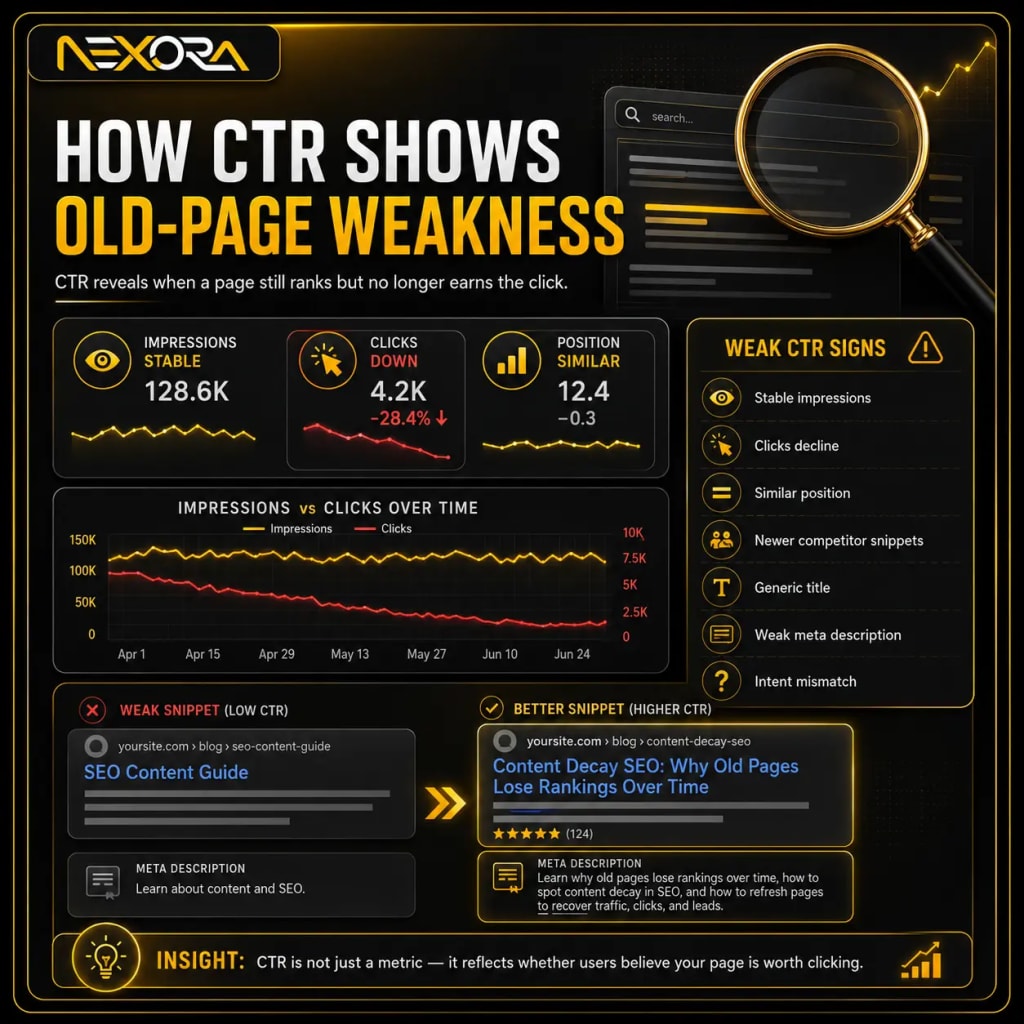
CTR shows how often users click your result after seeing it.
An old page may still rank but get fewer clicks because the title or meta description looks outdated.
Weak CTR signs include:
- Impressions remain stable
- Clicks decline
- Average position stays similar
- Competitors get more attractive snippets
- Search results show newer dates
- Your title feels generic
- Your meta description lacks benefit
- Your content title no longer matches current intent
Example weak title:
“SEO Content Guide”
Better title:
“Content Decay SEO: Why Old Pages Lose Rankings Over Time”
Example weak meta description:
“Learn about content and SEO.”
Better meta description:
“Learn why old pages lose rankings over time, how to spot content decay in SEO, and how to refresh pages to recover traffic, clicks, and leads.”
CTR is not only a technical metric.
It reflects whether users believe your page is worth clicking.
How does average position show content decay?
Average position shows where your page appears in Google results.
If average position worsens over time, your page may be losing competitiveness.
For example:
- Position 4
- Position 6
- Position 9
- Position 14
- Position 22
This usually means the page is moving down the results.
Reasons may include:
- Competitors improved
- Content became outdated
- Search intent changed
- Internal links weakened
- Backlinks were lost
- Page experience declined
- Technical SEO issues appeared
- Google chose another page
- The topic evolved
Average position can be noisy.
So always check it with impressions and clicks.
A small position drop may not matter.
But moving from page one to page two can reduce traffic significantly.
How can Google Analytics help identify content decay?
Google Analytics helps you see whether old pages still support business goals.
Search Console shows search visibility.
Google Analytics shows user behavior and conversions.
Check old pages for:
- Organic sessions
- Engagement
- Scroll depth
- CTA clicks
- Form submissions
- Phone call clicks
- Service-page visits
- Lead events
- Assisted conversions
- Revenue, if tracked
A page may not look weak in Search Console but may still fail as a business asset.
For example:
- Traffic remains stable
- Visitors do not click service pages
- No leads come from the page
- Engagement drops
- Users exit quickly
That means the page may need:
- Better CTA placement
- Better internal links
- Better service-page connection
- Stronger trust proof
- Better mobile layout
- Updated content
- Shorter path to conversion
Content decay is not only about rankings.
It is also about usefulness and lead quality.
What types of pages are most likely to decay?
Some pages decay faster than others.
High-risk pages include:
- SEO guides
- Digital marketing guides
- Tool tutorials
- Software comparisons
- Pricing guides
- Best tools lists
- Industry trend articles
- Local service guides
- Google Ads guides
- WordPress tutorials
- AI search articles
- CRM automation guides
- Social media tips
- Technical how-to articles
These pages decay quickly because tools, platforms, algorithms, and user expectations change.
Lower-risk pages include:
- Evergreen service pages
- Brand story pages
- Basic company pages
- Stable process pages
- Long-term educational pages
- Case studies, if still relevant
But even evergreen pages need updates.
A service page written years ago may still become weak if it lacks:
- Modern trust signals
- Better CTAs
- Updated examples
- AI-ready structure
- Current service details
- Strong internal links
- Better mobile UX
How does search intent change cause content decay?
Search intent changes when users expect a different type of answer than before.
A query may start as informational and later become commercial.
Or it may shift from blog results to service pages, videos, tools, or comparison pages.
For example:
A keyword like “AI chatbot for business” may now require:
- Use cases
- Pricing guidance
- Integration examples
- CRM connection
- Lead qualification workflows
- Service comparison
- Real implementation details
- FAQ answers
- Demo CTA
An old blog that only explains what an AI chatbot is may lose rankings.
To check search intent, search the keyword and review:
- What type of pages rank
- What headings they use
- Whether results are local or national
- Whether results are blogs or service pages
- Whether videos appear
- Whether tools appear
- Whether AI Overviews appear
- What questions People Also Ask shows
- What competitors explain better
Then update the page to match the current intent.
Do not assume search intent stays the same forever.
How do competitors cause content decay?
Competitors cause content decay when they publish stronger pages than yours.
Your page may not get worse.
But competitors may get better.
They may add:
- Better answers
- More examples
- Updated screenshots
- Stronger FAQs
- Clearer headings
- Better visuals
- Better internal links
- Better schema
- More expert insight
- Stronger backlinks
- Better page speed
- Better mobile experience
- Better CTAs
If five competitors improve and your page stays the same, your page becomes weaker by comparison.
That is why old content needs regular audits.
When I compare a decaying page against competitors, I look for:
- Missing subtopics
- Weak explanations
- Outdated examples
- Thin sections
- Poor readability
- Weak trust signals
- Weak CTA flow
- Poor internal linking
- Search intent mismatch
Then I update the page to become more useful, not just longer.
How does outdated information hurt rankings?
Outdated information makes users trust the page less.
It can also make the page less relevant for current searches.
Outdated content may include:
- Old statistics
- Old screenshots
- Old tools
- Old pricing
- Old platform names
- Old SEO tactics
- Old algorithm references
- Old plugin recommendations
- Old screenshots from Google Search Console
- Old CRM workflows
- Old AI chatbot examples
- Old service descriptions
- Old company processes
For SEO topics, outdated content can decay quickly because search behavior changes often.
For example, old content may not mention:
- AI Overviews
- AI search citations
- Entity SEO
- Helpful content
- Search intent shifts
- EEAT
- Google Search Console comparisons
- Conversion tracking
- CRM follow-up
- Technical SEO maintenance
A content refresh should remove outdated information and add current, practical guidance.
How do weak internal links cause content decay?
Internal links help search engines and users understand which pages matter.
If old pages stop receiving internal links, they can lose authority over time.
This happens when:
- New blogs do not link back to old pages
- Menus change
- Footer links change
- Category pages are removed
- Related content widgets disappear
- Service pages stop linking to supporting blogs
- Old articles become orphan pages
- Anchor text becomes vague
- Blog clusters are not maintained
A decaying page may need internal links from:
- Related blogs
- Service pages
- Homepage sections
- Pillar pages
- Category pages
- Case studies
- Location pages
- Contact pages, where relevant
For example, a page about content decay should internally connect to:
- SEO Services
- Website Development Services
- CRM Automation Services
- AI Voice Agent & Chatbot Services
But the link must make sense.
If the section explains content decay diagnosis, link to SEO Services.
If the section explains poor UX, link to Website Development.
If the section explains lead tracking and follow-up, link to CRM Automation.
Internal links should support both rankings and lead generation.
How do poor CTAs make old pages less valuable?
An old page may still bring traffic but fail to generate leads because the CTA is weak or outdated.
Common CTA problems include:
- No CTA
- Generic “Contact Us”
- CTA only at the bottom
- No service-specific CTA
- No button above the fold
- No internal link to relevant service
- No quote form
- No consultation option
- No chatbot support
- No clear next step
- CTA does not match the topic
A strong content refresh should improve CTAs.
Examples:
- Request an SEO Content Audit
- Review Your Old Pages
- Fix Declining Rankings
- Improve Website Conversion
- Connect Content Leads to CRM
- Add AI Chatbot Lead Capture
- Schedule a Website Review
If an old blog discusses declining rankings, the CTA should connect to SEO.
If it discusses poor conversion, the CTA should connect to website development.
If it discusses lost leads, the CTA should connect to CRM.
At Nexora Creation, I do not treat old blogs as static articles. I treat them as lead-generation pages that need updated CTAs, internal links, and conversion paths.
How does page experience affect content decay?
Page experience can affect how users interact with old content.
A page may lose performance if it becomes:
- Slow
- Hard to read
- Poor on mobile
- Filled with broken elements
- Difficult to navigate
- Too cluttered
- Hard to scan
- Missing clear CTAs
- Outdated in design
- Difficult to contact from
- Heavy with unoptimized images
Users expect fast, clean, mobile-friendly pages.
If an old page feels outdated, users may leave even if the information is useful.
Check:
- Mobile layout
- Font size
- Button spacing
- Image loading
- Core Web Vitals
- Navigation
- Forms
- CTA visibility
- Table readability
- Broken sections
- Popups
- Accessibility
If an old page has good content but poor UX, refreshing words alone may not recover performance.
A design and development fix may be needed.
How do broken links and old references hurt old pages?
Broken links reduce trust and user experience.
They also show that the page has not been maintained.
Old pages often contain:
- Broken external links
- Broken internal links
- Deleted image files
- Outdated tool links
- Redirected resources
- Old PDF links
- Old blog references
- Removed service pages
- Broken buttons
- Forms that no longer work
During a content decay audit, check:
- Internal links
- External links
- Button links
- Form links
- Image links
- Download links
- Anchor links
- Table of contents links
Fix broken links by:
- Updating the destination
- Replacing outdated resources
- Removing unnecessary links
- Redirecting deleted pages
- Linking to stronger internal pages
- Updating CTAs
A page with broken links may look abandoned.
A maintained page builds trust.
How does keyword cannibalization create content decay?
Keyword cannibalization happens when multiple pages compete for the same search intent.
This can make old pages lose rankings.
Signs include:
- Google switches ranking URLs
- Multiple pages rank for the same query
- One page declines when another appears
- Search Console shows query split across pages
- Similar titles exist
- Similar pages target the same keyword
- Internal links point to different competing pages
For example, if you have three pages about:
- Website not generating leads
- Why websites fail to convert
- Website conversion problems
Google may struggle to decide which page is the main answer.
To fix cannibalization:
- Choose the primary page.
- Merge overlapping content.
- Redirect weak duplicate pages if needed.
- Update internal links.
- Clarify each page intent.
- Improve the strongest page.
- Use unique titles and headings.
- Build supporting pages around different angles.
Do not create many pages for the same exact intent.
Build one strong page and support it with related content.
How does losing backlinks cause old pages to decline?
Backlinks can support rankings.
If an old page loses important backlinks, rankings may decline.
This can happen when:
- External pages are deleted
- Referring websites change URLs
- Old mentions are removed
- Redirects break
- Backlinks point to redirected pages
- Competitors earn stronger links
- Your content becomes less link-worthy
- Old research or examples lose relevance
Check backlinks for decaying pages.
Look for:
- Lost referring domains
- Lost links from strong websites
- Broken backlink destinations
- Links pointing to old URLs
- Declining link quality
- Competitors earning new links
To improve link value:
- Update the page with better information
- Add original data or examples
- Add visuals
- Add case studies
- Create link-worthy resources
- Redirect old URLs properly
- Promote updated content
- Link internally from strong pages
Not every content decay issue needs backlinks.
But lost backlinks can be part of the problem.
How do Google updates affect content decay?
Google updates can accelerate content decay.
A page that was already weak may lose more visibility after an update.
This does not always mean a penalty.
It often means Google reassessed quality, relevance, intent, or usefulness.
After a ranking drop, ask:
- Did many pages drop at once?
- Did one content type drop?
- Did thin pages decline?
- Did outdated pages decline?
- Did pages with weak EEAT decline?
- Did service pages remain stable?
- Did competitors change?
- Did AI Overviews appear more often?
- Did the SERP type change?
Do not respond with random edits.
Review:
- Helpful content quality
- Search intent match
- Page experience
- Original insight
- Internal links
- Technical SEO
- Trust signals
- Content freshness
- Lead value
Google updates often expose existing weaknesses.
Fix the weakness instead of chasing the update.
How do AI Overviews affect old content?
AI Overviews can reduce clicks for some informational queries because users may get answers directly in search results.
This can make old content look like it is decaying even if rankings did not drop much.
Check:
- Impressions stable but clicks down
- CTR down
- Informational queries affected
- More SERP features visible
- AI Overview appears for target queries
- Featured snippets changed
- People Also Ask expanded
To improve AI visibility, update old pages with:
- Question-based headings
- Direct answers
- Short paragraphs
- Clear definitions
- Step-by-step processes
- Expert explanations
- Original examples
- FAQs
- Schema-ready structure
- Trust signals
- Entity-rich content
AI search favors content that is easy to understand and cite.
That is why every old page refresh should also improve structure.
How do you decide which old pages to refresh first?
Do not refresh old pages randomly.
Prioritize pages with business value.
Start with pages that have:
- Previous organic traffic
- Previous leads
- Strong impressions
- High-value keywords
- Service relevance
- Ranking decline
- Lead-generation potential
- Strong internal link opportunity
- Existing backlinks
- Topical authority value
- Clear refresh potential
Avoid spending too much time on pages that have:
- No business value
- Very low impressions
- Wrong audience
- Duplicate intent
- No service connection
- Outdated topic with no demand
- Thin content that should be merged
- No lead potential
A page about “website not generating leads” is more valuable for Nexora Creation than a broad post about “what is a website.”
Why?
Because it connects directly to:
- Website Development
- SEO
- CRM Automation
- AI Chatbot Services
- Lead generation
Always refresh pages that can support revenue first.
How do you perform a content decay audit?
A content decay audit helps you find pages losing rankings, traffic, or lead value.
Use this process:
How do you find decaying pages?
Check:
- Google Search Console
- Google Analytics
- CRM lead source
- Call tracking
- Form submissions
- Service-page clicks
- Ranking tracker, if available
Look for:
- Declining clicks
- Declining impressions
- Declining leads
- Declining CTR
- Declining average position
- Declining engagement
- Fewer service-page visits
- Fewer assisted conversions
How do you diagnose the cause?
Review:
- Search intent
- Competitor pages
- Content freshness
- Technical SEO
- Internal links
- Backlinks
- Page experience
- Title tag
- Meta description
- CTA quality
- Trust signals
- Lead tracking
How do you decide the fix?
Choose one action:
- Refresh
- Expand
- Merge
- Redirect
- Rewrite
- Reposition
- Improve UX
- Add internal links
- Add CTA
- Add schema
- Update title and meta
- Remove or prune
Not every old page needs the same fix.
How do you refresh old content for SEO?
Refreshing old content means improving the page so it better matches current search intent and user needs.
Update:
- Title tag
- Meta description
- Introduction
- H2 and H3 headings
- Outdated facts
- Old examples
- Screenshots
- Internal links
- External references
- FAQs
- CTA sections
- Images
- Alt text
- Schema opportunities
- Trust proof
- Service connections
- Mobile formatting
A strong refresh should also add:
- New questions users ask
- Better direct answers
- More specific examples
- Current search intent coverage
- Better lead path
- Clear next step
- Updated expert insight
Do not refresh by only adding keywords.
Do not refresh by only changing the date.
Refresh the value.
How do you update the introduction of an old page?
The introduction should answer the user’s main query quickly.
A weak intro wastes time.
A strong intro gives immediate value.
For content decay, a strong intro should explain:
- What content decay is
- Why old pages lose rankings
- How the user can identify it
- What fixes matter
- Why it affects leads
Example intro structure:
- Direct answer
- Common signs
- Why it matters
- Expert perspective
- What the guide covers
Old pages often lose readers because the intro is too generic.
Update intros to match current intent.
This helps both users and AI systems understand the page faster.
How do you improve headings during a content refresh?
Headings should answer real user questions.
Question-based headings help:
- Readers scan faster
- Google understand structure
- AI systems extract answers
- Featured snippets
- People Also Ask targeting
- Content completeness
Weak headings:
- Content Decay
- Causes
- Fixes
- Tools
- Conclusion
Better headings:
- What is content decay in SEO?
- Why do old pages lose rankings over time?
- How can you identify content decay in Google Search Console?
- How do you refresh old content for SEO?
- When should you update, merge, or delete old pages?
Question-based headings improve readability and AI citation potential.
How do you improve internal links during a refresh?
Internal links should guide both Google and users.
During a refresh, add links from:
- Newer blogs to the old page
- Old page to relevant service pages
- Service pages to supporting guides
- Related articles to each other
- Pillar pages to supporting pages
- Location pages to related content
Use natural anchor text.
Good examples:
- SEO content audit
- Website conversion review
- CRM automation setup
- AI chatbot lead capture
- Technical SEO audit
- Content refresh strategy
Avoid:
- Click here
- Read more
- Exact keyword stuffing
- Random links
- Too many links in one section
If a content decay page discusses declining rankings, it should naturally link to SEO Services.
How do you improve CTAs during a content refresh?
A content refresh should improve the next step.
Old pages often have weak CTAs.
Replace vague CTAs with specific action-based CTAs.
Weak CTAs:
- Contact us
- Learn more
- Submit
- Get started
- Read more
Better CTAs:
- Request an SEO Content Audit
- Review Your Old Pages
- Fix Declining Rankings
- Improve Website Conversion
- Connect Your Leads to CRM
- Add AI Chatbot Lead Capture
- Schedule a Website Review
Place CTAs:
- After the intro
- After problem sections
- After audit sections
- Near service-related sections
- Before conclusion
- On mobile sticky areas, if appropriate
A CTA should match the page intent.
If the user is reading about content decay, the next step may be an SEO audit or content refresh strategy.
How do you improve trust signals on old pages?
Trust signals help users believe your advice.
Old pages may lose trust if they feel generic.
Add:
- First-hand experience
- Practical examples
- Case studies
- Client feedback
- Screenshots
- Process explanations
- Updated recommendations
- Author expertise
- Company expertise
- Real service examples
- Before-and-after content improvements
- Clear limitations
- Honest advice
For example:
“When I audit a decaying SEO page, I do not start by rewriting everything. I first check GSC impressions, CTR, average position, ranking queries, internal links, SERP intent, and conversion data.”
That type of statement shows experience.
It also helps the reader trust the process.
How do you know when to merge old pages?
Merge old pages when multiple pages target the same intent and split authority.
Signs you should merge:
- Similar topics
- Similar keywords
- Similar H1s
- Similar search intent
- Weak performance across all pages
- Keyword cannibalization
- Duplicate sections
- Users would benefit from one stronger guide
Example:
Instead of three weak pages:
- What is content decay?
- Why old pages lose traffic
- How to update old SEO content
You may create one stronger guide:
- Content Decay SEO: Why Old Pages Lose Rankings Over Time
Then redirect weaker URLs to the strongest page when appropriate.
Merging improves clarity.
But do not merge pages with different intent.
How do you know when to delete old content?
Deleting content is risky.
Do it only when the page has no value.
Consider deleting or pruning a page if it has:
- No traffic
- No impressions
- No backlinks
- No internal link value
- No service relevance
- No useful information
- Duplicate content
- Outdated topic with no demand
- Thin content
- Poor quality
- No realistic refresh potential
Before deleting, check:
- Does it have backlinks?
- Does it rank for any keyword?
- Does it support internal links?
- Does it receive referral traffic?
- Does it help users?
- Can it be merged?
- Should it redirect?
Most old pages should be refreshed or merged, not deleted.
How do you prevent content decay before it happens?
You prevent content decay by maintaining content regularly.
Use a content maintenance system.
Include:
- Monthly GSC review
- Quarterly content decay audit
- Annual full content refresh
- Internal link updates after new posts
- CTA updates
- Competitor SERP reviews
- Technical SEO checks
- Broken link checks
- Google Analytics lead tracking
- CRM lead source review
- Service-page connection review
- AI search formatting review
Create a content refresh schedule.
For high-value pages, review every:
- 3 months for fast-changing SEO topics
- 6 months for service pages
- 12 months for evergreen educational guides
- Immediately after major platform changes
- Immediately after ranking drops
SEO content should not be abandoned after publishing.
How can content decay affect lead generation?
Content decay can reduce leads even before traffic drops heavily.
This happens when old pages lose buyer-intent visibility.
For example, an old page may still get traffic for broad queries but lose rankings for high-intent queries like:
- SEO content audit service
- Website conversion audit
- CRM automation for leads
- AI chatbot for lead generation
- Content not generating leads
- Website not generating leads
That means lead quality drops.
Content decay can affect:
- Service-page visits
- Consultation requests
- Quote forms
- Phone calls
- Chatbot starts
- CRM leads
- Assisted conversions
- Organic pipeline value
That is why I always connect content decay audits with lead tracking.
A page is not healthy just because it has traffic.
It is healthy when it attracts the right users and moves them toward action.
How can CRM data help detect content decay?
CRM data shows whether content still creates business opportunities.
Google Search Console shows visibility.
Google Analytics shows behavior.
CRM shows lead quality.
Use CRM data to check:
- Which pages created leads
- Which topics generated enquiries
- Which keywords assisted deals
- Which forms converted
- Which leads became customers
- Which content supported sales calls
- Which service areas produced leads
- Which pages stopped producing enquiries
If a page once created qualified leads but now does not, it may be decaying.
CRM automation can help tag:
- Lead source
- Service interest
- Page visited
- Campaign
- Content topic
- Form type
- Follow-up status
- Deal stage
If your content gets traffic but lead tracking is unclear, Nexora Creation can help connect content, forms, calls, chatbot leads, and CRM automation.
Can AI chatbots help old pages convert better?
Yes, AI chatbots can help old pages convert better when visitors have questions before contacting you.
An old page may attract visitors who need help but are not ready to fill out a form.
An AI chatbot can ask:
- What problem are you trying to fix?
- Is your traffic declining?
- Is your content outdated?
- Do you need an SEO audit?
- Do you want help updating old pages?
- What is your website URL?
- What service are you interested in?
- What is your preferred contact method?
It can answer:
- What is content decay?
- How do I know if my page is decaying?
- Can old pages recover rankings?
- Should I update or delete old content?
- Do you provide content audits?
- Can I request a consultation?
This helps capture more leads from old pages.
But chatbot leads should connect to CRM.
Otherwise, conversations can still get lost.
AI Voice Agent & Chatbot Services
How can Nexora Creation help fix content decay?
Nexora Creation helps businesses identify, refresh, and improve old pages that are losing rankings, traffic, or lead value.
For content decay SEO, we can help with:
- Google Search Console analysis
- Content decay audit
- Page performance review
- Keyword loss diagnosis
- Search intent analysis
- Competitor gap review
- Old blog refreshes
- Service-page updates
- Internal linking improvements
- Technical SEO checks
- Website UX improvements
- CTA optimization
- CRM lead tracking
- AI chatbot setup
- AI search optimization
- Content pruning and merging
- Conversion-focused page updates
The goal is not only to recover traffic.
The goal is to recover qualified visibility that can turn into real enquiries.
If your old pages are losing rankings or no longer generating leads, the issue may be content freshness, technical SEO, internal links, website UX, or lead tracking.
What is the best strategy to fix content decay?
The best strategy is to refresh old pages based on data, not guesswork.
A strong content decay strategy includes:
- Google Search Console comparison
- Google Analytics review
- CRM lead source review
- Search intent analysis
- Competitor gap analysis
- Technical SEO check
- Internal link audit
- CTA review
- Content freshness update
- EEAT improvement
- Page experience improvement
- AI search formatting
- Ongoing monitoring
Do not refresh every old page equally.
Prioritize pages that support:
- Leads
- Service visibility
- Revenue
- Topical authority
- Local SEO
- Buyer intent
- High-value content clusters
Content decay is not fixed by publishing more content.
It is fixed by maintaining and improving the content assets you already have.
Conclusion
Content decay SEO explains why old pages lose rankings, traffic, clicks, and leads over time.
A page may decline because:
- Search intent changed
- Competitors improved
- Information became outdated
- Internal links weakened
- CTR dropped
- SERP features changed
- AI Overviews reduced clicks
- Technical SEO issues appeared
- Page experience declined
- CTAs became weak
- The page stopped supporting lead generation
The solution is not always to create a new page.
In many cases, the best solution is to refresh the existing page.
Use Google Search Console to find declining pages.
Use Google Analytics and CRM data to understand lead impact.
Then improve content, headings, internal links, CTAs, technical SEO, page experience, and trust signals.
Old pages can recover.
But only if you treat them as active business assets, not forgotten blog posts.
A strong SEO strategy does not only publish.
It maintains, updates, improves, and connects content to real business outcomes.
FAQs
What is content decay in SEO?
Content decay in SEO happens when an old page loses organic rankings, impressions, clicks, traffic, or leads because it becomes outdated, incomplete, less useful, or weaker than competing pages.
Why do old pages lose rankings?
Old pages lose rankings because search intent changes, competitors improve, information becomes outdated, internal links weaken, technical issues appear, or the page no longer provides the best answer.
How do I find content decay in Google Search Console?
Open the Performance report, compare date ranges, check Pages, find URLs with declining clicks or impressions, then review Queries to see which keywords lost visibility.
How often should I refresh old content?
Review high-value pages every 3 to 6 months and evergreen content at least once a year. Fast-changing topics like SEO, AI, CRM, and digital marketing may need more frequent updates.
Should I update old pages or create new pages?
Usually, update the old page if it still has rankings, backlinks, or search history. Create a new page only when the search intent is different or the topic deserves a dedicated page.
Can content decay affect leads?
Yes. Content decay can reduce leads when old pages lose buyer-intent keywords, service-page clicks, form submissions, calls, or assisted conversions.
Does changing the publish date fix content decay?
No. Changing only the publish date does not fix content decay. You need to improve the content, search intent coverage, internal links, CTAs, examples, and page experience.
Can internal links help fix content decay?
Yes. Internal links can help old pages regain relevance and authority when they come from related blogs, service pages, pillar pages, and other useful content.
Can AI Overviews cause content decay?
AI Overviews can reduce clicks for some informational queries, even when rankings remain stable. Updating content with clear answers, FAQs, expert insight, and structured headings can help.
What is the biggest content decay mistake?
The biggest mistake is publishing new content while ignoring old pages. A strong SEO strategy should maintain existing content, update declining pages, and connect old pages to current services and lead paths